
An Ultimate Guide: What’s the Difference Between WordPress.com vs WordPress.org?
Table of Contents
ToggleAn Ultimate Guide in 2026: ‘What’s the Difference Between WordPress.com vs WordPress.org?’ – by Academy of Web Technologies & Information Management (AWTIM)
If you have decided to build a website, start a blog, or launch an online store in India, there is a very high chance you have been advised to “just use WordPress.” It is, after all, the powerful engine that powers nearly half of the entire internet. However, within minutes of starting your research and trying to sign up, you will almost certainly hit a massive roadblock that confuses millions of beginners every single year: the split between WordPress.com and WordPress.org.
When you type “WordPress” into Google, you are presented with two entirely different websites. One website promises a free, easy-to-use website builder where you can sign up with your email address in seconds. The other website offers downloadable software that requires you to purchase your own web hosting. They share the exact same name, the exact same logo, and the exact same original founder. So, what exactly is the deal here?
This is the single most common point of confusion for beginners in the website-building world. Many people accidentally sign up for one platform when they actually needed the other. This simple mistake often leads to intense frustration, wasted money, and the massive headache of having to migrate an entire website later on when they realize they made the wrong choice for their business.
In this massive, comprehensive, and simple-to-understand guide, we are going to break down the difference between WordPress.com vs WordPress.org once and for all. We will explore their basic features in great detail, compare their pros and cons side-by-side, dive deep into the pricing (with all costs calculated accurately in Indian Rupees – INR), and give you a detailed, step-by-step roadmap so you can choose the exact right platform for your needs.
Whether you are a hobbyist blogger in Mumbai, a small business owner in Delhi, or an aspiring e-commerce entrepreneur looking to sell products across the globe, this guide will give you the clarity you need. Grab a cup of coffee, get comfortable, and let us dive deep into the world of WordPress!
The History: Why Do They Share the Same Name?
To truly understand the difference between WordPress.org vs WordPress.com, it helps to understand a little bit of history. Why would two different platforms share the same name and confuse everyone?
Back in 2003, developers Matt Mullenweg and Mike Little created a piece of software designed to help people publish blogs easily. They made this software “open-source.” Open-source means the underlying code is completely free for anyone in the world to use, modify, study, and distribute. Nobody technically owns it; it belongs to the public. They hosted this free software project at WordPress.org. It grew incredibly fast, evolving from a simple blogging tool into a full-fledged Content Management System (CMS) capable of building massive corporate websites.
However, Matt Mullenweg soon realized a major problem. While the software was free and powerful, setting it up was too technical for the average person. To use WordPress.org, a user had to go out, rent server space (web hosting), buy a domain name, create databases, and install the software manually. Many non-technical people simply gave up.
To solve this, Mullenweg founded a private, for-profit company called Automattic. This company created a service at WordPress.com. The goal of WordPress.com was to take the complicated, free WordPress software, install it on Automattic’s own massive servers, and offer it to the public as a simple, hosted service. Users could just sign up and start writing, without ever touching a server.
So, the name is the same because the core technology is the same. But the way it is delivered, managed, and monetized is completely different.
The Short Answer: The Real Estate Analogy
Before we dive into the technical details, code, and servers, let us use a simple, real-life analogy to explain the difference between WordPress.com vs WordPress.org. Understanding this basic concept will make the rest of the guide make perfect sense to anyone, regardless of their technical background.
WordPress.com is like renting an apartment in a strict, managed society
When you rent an apartment in a highly managed residential society, the landlord or the building management takes care of absolutely everything outside your door. They provide security at the gate, they fix the plumbing when it breaks, they sweep the corridors, and they ensure the electricity and water are always running. It is incredibly convenient. You just move your furniture in, unpack your bags, and start living your life without any stress.
However, because you do not own the building, there are strict rules you have to follow. You might not be allowed to knock down a wall to make the living room bigger. You definitely cannot paint the exterior of the building neon green. You might not even be allowed to install your own custom security system, bring in outside contractors, or run a commercial shop from your living room. You trade your absolute freedom for convenience, ease of use, and peace of mind.
WordPress.org is like buying an empty plot of land and building your own custom house
On the other hand, WordPress.org is like buying an empty plot of land and building your own custom house from the ground up. You own the land (which represents your web hosting server), and you own the house (which represents your website). Because you are the absolute owner of the property, you have total, unrestricted freedom.
You can paint the walls any color you want, build a massive three-story extension, tear down the living room and start over, or turn the entire house into a commercial shop to make money. Nobody can tell you what to do with your property.
But with this incredible freedom comes real responsibility. If the roof leaks during the monsoon season, you have to find someone to fix it. You are entirely in charge of your own security, your own maintenance, your own insurance, and paying your own utility bills. If something breaks, it is up to you to fix it or hire an expert.
To summarize the core difference in technical terms:
- WordPress.org is the core software itself. It is a 100% free system. You download it and install it on your own purchased web space. Because of this, you are the boss.
- WordPress.com is a for-profit service (a hosting company) built using the WordPress software. They host your site for you, manage all the technical server-side tasks, and charge you a subscription fee to unlock more advanced features.
What is WordPress.org? (The Self-Hosted Behemoth)
When professional web developers, veteran bloggers, digital marketing agencies, and massive companies talk about using “WordPress,” they are almost always talking about WordPress.org. In the web development industry, this is commonly referred to as self-hosted WordPress.
As mentioned earlier, WordPress.org is the home of the original, open-source software. However, just because the software itself is free does not mean your website will be entirely free to run. To make a WordPress.org website visible on the internet to customers in India or around the world, you must have two critical components:
- A Domain Name: This is your website’s permanent address on the internet (for example, yourbusinessname.in or myawesomeblog.com). Without a domain name, people would have to type a long string of numbers (an IP address) to find you.
- Web Hosting: This is a physical server (a powerful computer connected to the internet 24/7) where your website’s files, images, texts, and databases actually live.
You purchase these two things from third-party hosting companies (like DomainHostingKolkata, Hostinger, Bluehost, HostGator, or SiteGround), and then you install the free WordPress.org software onto your hosting space. Most modern Indian hosting companies have a “One-Click Install” button, making this process incredibly simple.
Basic Features of WordPress.org
- 100% Free Core Software: The CMS itself costs absolutely nothing to download, use, or upgrade.
- Complete Ownership and Control: You own every single piece of your content, your data, and your website infrastructure. Nobody can shut your site down because you violated an arbitrary platform’s terms of service.
- Unlimited Plugin Access: Plugins are like apps for your smartphone, but for your website. With WordPress.org, you can install any of the 59,000+ free plugins from the official directory instantly.
- Unlimited Theme Access: You can use any free theme, buy a premium theme from marketplaces like ThemeForest, or hire a developer to custom-code a completely unique design.
- Full Monetization Control: You have zero restrictions on how you make money. You can run Google AdSense, keep 100% of the ad revenue, sell products, and create paid memberships.
- Under-the-Hood Access: If you are technical, you have complete access to your website’s database (MySQL) and server-side PHP code.
Pros & Cons of WordPress.org
The Pros:
- Total Freedom and Flexibility: If you can imagine it, you can build it. There are absolutely zero restrictions on how your site looks or functions. It can be a one-page portfolio today and a massive online store tomorrow.
- Better Long-Term Value in INR: While you do have to pay for web hosting (which can be very cheap in India), you are not forced into expensive monthly subscriptions just to unlock basic features like a contact form or an SEO tool.
- Powerful E-commerce: By simply installing the free WooCommerce plugin, WordPress.org becomes a highly capable e-commerce platform, allowing you to integrate Indian payment gateways like Razorpay, PayU, or Instamojo with ease.
- Unmatched SEO Potential: Search Engine Optimization is crucial for getting found on Google. With self-hosted WordPress, you can optimize every single line of code to outrank your competitors.
The Cons:
- Steeper Learning Curve: It takes a little bit of time to learn how the ecosystem works. You have to learn the difference between themes, plugins, widgets, and menus.
- You Are the Janitor: You are responsible for keeping your site running securely. You have to manually update your plugins when new versions come out and back up your data regularly.
- No Centralized Support Button: Because it is free software, there is no official “WordPress Customer Care” toll-free number to call if your site breaks. You must rely on your hosting company’s support team or community forums.
What is WordPress.com? (The All-In-One Service)
Now let us flip the coin and look at the other side. WordPress.com is a commercial, for-profit website builder service owned by Automattic.
WordPress.com operates similarly to other website builders like Wix, Squarespace, or Shopify. This means the company takes the complicated WordPress.org software, installs it on their own massive, highly optimized servers, and packages it into a user-friendly, subscription-based service. You do not have to go out and buy a domain name from one company and web hosting from another. You simply go to WordPress.com, create an account, pick a plan, and they handle all the technical heavy lifting behind the scenes.
However, there is a massive catch that catches many Indian business owners off guard. To provide this highly managed, secure, and beginner-friendly experience, WordPress.com heavily restricts what you can actually do with the software. They lock away the “real” power of WordPress (like custom plugins and third-party themes) and only allow you to access them if you upgrade to their most expensive premium tiers.
WordPress.com Pricing Plans in INR (Approximate Costs)
To truly understand WordPress.com, you must understand how they price their services. What you can and cannot do on your website is entirely dictated by how much money you pay them every month. (Note: Pricing fluctuates slightly based on current USD to INR exchange rates and promotional discounts, but these are the standard benchmarks for annual billing in 2026).
- Free Plan (₹0): This is great for a temporary hobby journal, but not much else. You get a subdomain (like yourname.wordpress.com instead of a real .in or .com), very limited storage space, and WordPress.com will place their own advertisements on your site (which you do not get paid for). Most importantly, you cannot install custom plugins or themes.
- Starter / Personal Plan (Approx. ₹160 – ₹300/month, billed annually): Upgrading to this plan removes the forced WordPress.com ads, lets you connect a custom professional domain name, and gives you basic email support. However, you still cannot install plugins.
- Explorer / Premium Plan (Approx. ₹300 – ₹600/month, billed annually): This tier gives you more storage, advanced design customization tools, the ability to integrate Google Analytics, and the ability to earn ad revenue through their WordAds program. Shockingly, you still cannot install custom plugins or upload third-party themes.
- Creator / Business Plan (Approx. ₹1,000 – ₹2,000/month, billed annually at ₹12,000 to ₹24,000+): This is the critical threshold. Upgrading to the Business/Creator plan finally unlocks the true power of WordPress. At this high price point, they finally allow you to install custom plugins and third-party themes. You also get generous storage and priority live chat support.
- Entrepreneur / Commerce Plan (Approx. ₹2,000 – ₹3,600+/month, billed annually): This is designed specifically for online stores. It adds advanced e-commerce integrations, premium store designs, inventory management, and shipping integrations.
Basic Features of WordPress.com
- All-in-One Hosting Included: You do not need to shop around for a server; it is built seamlessly into the service.
- Managed Security & Updates: You never have to worry about updating the core software, performing database backups, or fighting off malware. Automattic’s engineers handle all security.
- Built-in Speed: WordPress.com servers are highly optimized specifically for WordPress, so your site will generally load incredibly fast right out of the box.
- Easy Setup: You can launch a basic website or blog in about 5 to 10 minutes using a very guided, visually pleasing setup wizard.
Pros & Cons of WordPress.com
The Pros:
- Incredibly Easy for Beginners: You do not need to know anything about servers, control panels, FTP, databases, or coding.
- Completely Maintenance-Free: You can focus 100% on writing content, uploading photos, or building your business while they handle all the boring technical chores in the background.
- Bulletproof Security: Because the environment is locked down by their corporate engineers, it is exceedingly difficult for a WordPress.com site to get hacked.
- Dedicated Customer Support: Paid plans come with live chat and email support directly from WordPress experts.
The Cons:
- Heavily Restricted on Lower Tiers: This cannot be overstated. If you want to add a simple, free, third-party WhatsApp chat button plugin to help your local Indian customers contact you, you simply cannot do it on the Free, Personal, or Premium plans. You are forced to pay the massive Creator/Business plan fee just to access free plugins.
- Platform Lock-in: You do not truly own your website’s environment. If you violate their specific terms of service, they can theoretically suspend or delete your site.
- More Expensive Long-Term: Paying ₹15,000 to ₹25,000 a year for the ability to use plugins is vastly more expensive than buying standard Indian web hosting (which can cost ₹1,500 to ₹3,500 a year) to run the exact same WordPress.org software.
- Limited Monetization: You cannot freely run your own display ads (like Google AdSense) on lower-tier plans. You are highly restricted in how you make money.
Deep Dive: The 7 Major Differences Between WordPress.com vs WordPress.org
Now that we have established the broad strokes and basic definitions, let us get down to the granular details. If you are trying to make a serious business decision, you need to know exactly how the difference between WordPress.com vs WordPress.org impacts your day-to-day operations and your bank account. We will compare them across seven critical categories.
1. Pricing and Total Cost of Ownership in INR
Cost is often the biggest deciding factor for beginners, especially in India where budget constraints are real for startups and small businesses. However, pricing in the WordPress world can be highly deceptive.
WordPress.org Costs (Self-Hosted):
The software itself is free, but you must pay for hosting and a domain name.
- Domain Name: A standard .in or .com domain costs roughly ₹800 to ₹1,500 per year.
- Budget Web Hosting: Quality beginner hosting from companies like Hostinger India, Bluehost, or Domain Hosting Kolkata costs roughly ₹100 to ₹300 per month (often billed as a 1-year or 4-year package).
- Total Entry Cost: You can easily start a fully functional, 100% unrestricted WordPress.org site for about ₹2,500 to ₹5,000 for your entire first year (including hosting and domain).
WordPress.com Costs:
You can start for free, but a free site looks highly unprofessional (it has ads and a .wordpress.com domain). To get a professional site that actually allows you to use WordPress’s famous plugins, you must upgrade to the Business/Creator plan.
- Business Plan: Approximately ₹12,000 to ₹24,000 per year depending on current offers.
- Total Entry Cost: To get the exact same level of flexibility and plugin access that a ₹3,000/year WordPress.org site gives you, you must spend a minimum of ₹12,000+ per year on WordPress.com.
The Verdict: While WordPress.com seems cheaper initially because of its “Free” tier, WordPress.org offers vastly superior long-term value for money if you want to build anything more complex than a basic personal diary.
2. Customization and Themes
Themes dictate how your website looks, feels, and navigates. The beauty of WordPress is that you can change your site’s entire aesthetic with a single click.
WordPress.org: You have absolute, unrestricted freedom. You can install thousands of free themes from the official WordPress repository. You can purchase stunning premium themes from marketplaces. Most importantly, you can use powerful page builder plugins like Elementor, Divi, or Beaver Builder to drag-and-drop a completely custom design from scratch without knowing how to code.
WordPress.com: If you are on the Free, Personal, or Premium plan, you are firmly locked into a curated list of pre-approved themes provided by WordPress.com. You cannot upload themes you bought elsewhere. Furthermore, your ability to customize the CSS (the code that dictates exact colors and layouts) is heavily restricted. You only get the freedom to upload custom themes and use heavy-duty page builders if you pay the high price for the Business plan.
3. Flexibility and Plugins
Plugins are the absolute lifeblood of the WordPress ecosystem. They are small pieces of software that add specific features to your site. Without plugins, WordPress is just a basic blogging tool. With plugins, it can be a global enterprise.
WordPress.org: You have instant, unrestricted access to over 59,000 free plugins the second your site goes live. You can install an SEO optimizer, a security firewall, a WhatsApp chat button, an image compressor, and a complex booking calendar system entirely for free.
WordPress.com: As mentioned, you cannot install custom plugins on WordPress.com unless you are on the Business plan or higher. You are entirely walled off from the broader WordPress plugin ecosystem until you pay the premium price. This is the biggest dealbreaker for most small business owners.
4. Monetization (Making Money)
If your goal is to generate income from your website—whether through a side hustle, affiliate marketing, or a full-time business—the platform you choose heavily dictates how you can do it.
WordPress.org: You own the site, so you make the rules. You can place Google AdSense ads anywhere you want, sell direct banner space to local sponsors and keep 100% of the profit, use Amazon affiliate links without restriction, and set up a full online store. There are absolutely no caps on how much money you can make, and you never owe WordPress a percentage.
WordPress.com: Monetization is highly restricted and tightly controlled on the lower tiers. You cannot run Google AdSense or standard third-party display networks on the Free, Personal, or Premium plans. If you are on the Free plan, WordPress.com actually runs their own ads on your site, and they keep all the money. To build a robust e-commerce store with proper Indian shipping integrations (like Shiprocket) and local payment gateways (like Razorpay, CCAvenue, or UPI), you generally need their highly expensive Commerce plan.
5. SEO (Search Engine Optimization)
SEO is the complex process of making your website rank higher on Google so you get free, organic traffic.
WordPress.org: Self-hosted WordPress is widely considered the absolute best CMS in the world for SEO. Right out of the gate, you can install incredibly powerful, free SEO plugins like Yoast SEO, Rank Math, or All in One SEO. You can edit your .htaccess files, optimize your site’s speed at the server level, implement advanced Schema markup so Google understands your business better, and meticulously control how search engine bots crawl your site.
WordPress.com: While the platform is built with good, clean basic SEO architecture out of the box, your hands are completely tied on the lower plans. You cannot install advanced tools like Rank Math unless you have the Business plan. You also lack server-level access, meaning you cannot implement deeply advanced technical SEO optimizations. For casual blogging, the built-in SEO is fine. But if you are in a highly competitive market in India trying to outrank other businesses, lower-tier WordPress.com plans will severely hold you back.
6. Maintenance, Security, and Backups
Running a successful website requires a bit of janitorial work to ensure it does not break, slow down, or get hacked by malicious bots.
WordPress.com: This is where WordPress.com truly shines brightest. You do not have to do anything. Their world-class engineering team handles all software updates in the background. They patch security vulnerabilities instantly. They block spam automatically, and they perform automated daily backups of all your data. It is highly unlikely your site will ever be hacked. It is a completely hands-off, stress-free experience.
WordPress.org: You are the systems administrator. When you log in, you will see notifications telling you to update your themes and plugins. You must manually click the “update” button. If an update clashes with another piece of code and breaks your site, you have to figure out how to restore it. You need to install a security plugin (like Wordfence) to block hackers, and you must set up your own automated backup system (using a free plugin like UpdraftPlus). (Note: Many modern web hosting providers in India now offer automatic core updates and daily backups built into their ₹200/month plans, which takes away a lot of this headache).
7. Support and Help
When you get stuck, make a mistake, or break your website’s layout, who do you call for help?
WordPress.org: Because it is free, open-source software, there is no official central customer support team. You cannot email “WordPress HQ” to ask why your image will not align properly. Instead, you rely on your web hosting company’s support team (if your server goes down), the massive global community of WordPress users (forums, YouTube tutorials), or hiring freelance developers for complex custom fixes.
WordPress.com: If you are a paying customer, you get professional, dedicated support. The Personal plan offers standard email support. The higher tiers offer direct, real-time Live Chat support. If you value the safety net of being able to chat with an expert the moment something goes wrong, WordPress.com offers exceptional peace of mind.
Summary Comparison Table
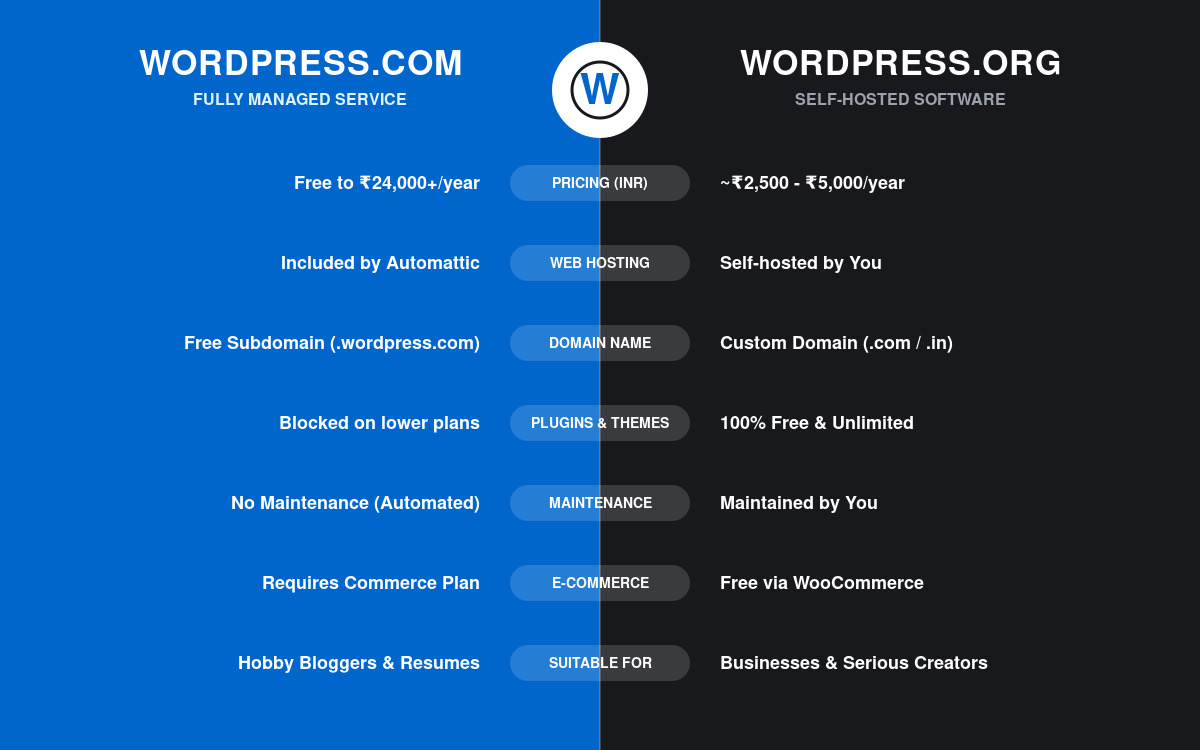
Here is a quick, easy-to-scan summary of the core difference between WordPress.org vs WordPress.com to help you make your final decision:
| Feature / Element | WordPress.org (Self-Hosted) | WordPress.com (Hosted Service)
|
| Software Cost | 100% Free forever | Free basic plan; Paid plans up to ₹3,600+/mo |
| Hosting required? | Yes, must purchase separately (₹100-₹300/mo) | No, included automatically in all plans |
| Domain Name | Must purchase separately (~₹800/year) | Subdomain free; Custom domain needs a paid plan |
| Custom Plugins | Unlimited access instantly (Free) | Blocked unless you buy the expensive Business Plan |
| Custom Themes | Unlimited access instantly (Free) | Blocked unless you buy the expensive Business Plan |
| Monetization & Ads | Keep 100% of revenue, zero limits | Highly restricted on lower plans |
| Maintenance & Backups | Your responsibility (updates, backups) | Fully managed and automated by WordPress.com |
| Technical Skills Required | Requires a slight learning curve | Extremely beginner-friendly, plug-and-play |
| E-commerce / Store | Free instantly with WooCommerce plugin | Requires the highly expensive Commerce Plan |
Where & When to Choose Which Platform? Real-World Scenarios
Still on the fence? Sometimes looking at a list of technical features is not enough. Let us look at a few highly specific, real-world scenarios to help you decide exactly which platform you should invest your time and money into based on your unique situation.
Choose WordPress.com If…
- You are starting a personal hobby blog or family journal: If you just want a place to write thoughts, share poetry, or post travel photos for your friends and family, the Free or cheap Personal plan is absolutely perfect. You do not need custom plugins or ads for this.
- You are utterly terrified of technology: If the mere thought of “installing software,” “updating plugins,” or “managing a server dashboard” gives you severe anxiety, WordPress.com is a safe, cozy, fully managed environment where you cannot really break anything.
- You want a simple static portfolio: If you are an artist, freelance writer, or photographer who just needs 5 simple, static pages to show off your past work and a basic contact form, WordPress.com’s lower-tier plans will get you online beautifully in under an hour.
- You are a corporate business with a large budget for convenience: If you are a business owner who has no problem paying ₹25,000 to ₹50,000 a year for the top-tier plans just so you never have to think about security, malware, or server downtime, WordPress.com is a highly reliable, enterprise-grade service.
Choose WordPress.org If…
- You are starting a serious business website: You need a professional domain, custom features tailored to your Indian audience, and the ability to scale without limits. You should not be handcuffed by an arbitrary platform’s limitations.
- You want to make money online (Blogging/Affiliate): Whether you are building an affiliate marketing blog reviewing electronics, a high-traffic news site running Google AdSense, or a recipe site, you need the absolute unrestricted monetization freedom of WordPress.org.
- You want to launch an E-commerce store in India: Why pay ₹40,000 a year for WordPress.com’s Commerce plan when you can buy cheap hosting for ₹3,000 a year and instantly install WooCommerce to sell physical or digital goods? You can easily integrate Razorpay, Instamojo, or PayU to accept UPI payments from Indian customers using self-hosted WordPress.
- You are on a tight budget but need powerful features: If you are a student or a boot-strapped startup in India, WordPress.org allows you to build a social network, an online course platform, or a complex directory for incredibly cheap by utilizing free plugins.
- You want to learn Web Design/Development as a career: If your goal is to learn how to build websites for clients or master SEO as a career, you must learn the self-hosted WordPress.org ecosystem. It is the absolute industry standard globally.
Step-by-Step Guide: How to Start with WordPress.com
If you have decided that the managed, hands-off approach of WordPress.com is the right fit for your current goals, getting started is incredibly simple and takes very little time. Follow these steps:
- Visit WordPress.com and Create an Account: Go to the official WordPress.com homepage and click the button that says “Start your website.” You will be prompted to create an account using your email address, or you can speed up the process by connecting your Google or Apple account.
- Choose Your Domain Name: Type in the name you want for your website. The system will show you available options. You can choose the free version (e.g., youridea.wordpress.com) or select a custom professional domain (e.g., youridea.in). Note: selecting a custom domain will require you to pick a paid plan in the next step.
- Select a Pricing Plan: Choose the plan that fits your current budget. Remember, you can always start on the Free or Personal plan to test the waters and upgrade later if you decide you absolutely need custom plugins or premium themes.
- Pick a Theme and Customize: Browse their curated library of available themes and select one that fits your aesthetic. You will then be dropped into the site editor where you can easily change the title, add a logo, and adjust basic brand colors.
- Publish Your First Post: Navigate to the “Posts” section in your left-hand dashboard menu, click “Add New,” write your first piece of content, add a featured image, and hit the big “Publish” button. Congratulations, your site is now live on the internet!
Step-by-Step Guide: How to Start with WordPress.org
If you have decided you want total freedom, maximum flexibility, and absolute ownership, you need to go the self-hosted route. Do not worry—it sounds much more technical than it actually is. Almost all modern web hosts in India have made this process practically automatic. Here is how to do it:
- Choose a Web Hosting Provider: You need to rent server space. Popular beginner-friendly options in India include Aspectall Technologies, Hostinger, Bluehost, or SiteGround. Visit their website and select a basic shared hosting plan (usually costing between ₹100 to ₹300 per month).
- Register Your Domain Name: During the hosting checkout process, you will be asked to register a domain name. Many top hosting providers actually give you your first year of domain registration entirely for free when you buy a 12-month hosting package. Type in your desired name, ensure it is available, and secure it.
- Use the Auto-Installer: Once you complete your purchase, log into your new web hosting dashboard. You will not need to go to WordPress.org and manually download complex code files. Look for a button in your hosting dashboard that says “Auto-Installer,” “Install WordPress,” or “Site Tools.” Follow the simple wizard, create an admin username and a strong password, and the host will automatically deploy the software to your new domain in about 60 seconds.
- Log into Your New Dashboard: You can now access your website’s backend by typing yourwebsite.com/wp-admin into your web browser. Enter the username and password credentials you just created in the previous step. Welcome to your self-hosted WordPress dashboard!
- Install Themes and Plugins: Go to Appearance > Themes to browse thousands of free designs and activate one. Then, go to Plugins > Add New to install powerful free tools like SEO optimizers (Rank Math), security firewalls (Wordfence), caching tools for speed (LiteSpeed Cache), and contact forms (WPForms). You have absolutely no restrictions—start building your empire!
How to Migrate from WordPress.com to WordPress.org
What happens if you originally started your blog on WordPress.com, outgrew the free or cheap plans, and suddenly realized you do not want to pay ₹15,000+ a year for the Business plan just to install a basic plugin? You are not trapped. You can migrate your entire site to a self-hosted WordPress.org setup without losing your hard-written blog posts. Here is the basic process:
- Purchase Hosting: Buy a standard hosting plan from a provider like Hostinger or Aspectall Technologies and set up a blank WordPress.org installation.
- Export Your Content: Log into your old WordPress.com dashboard. Go to Tools > Export. Click “Export All” to download an XML file to your computer. This file contains all your text posts, pages, categories, and tags.
- Import Your Content: Log into your new self-hosted WordPress.org dashboard. Go to Tools > Import. Find the “WordPress” importer at the bottom of the list, install it, run it, and upload the XML file you downloaded in Step 2.
- Point Your Domain: If you bought a custom domain (like yourname.in) through WordPress.com originally, you will need to go into your domain settings on WordPress.com and change the “DNS Nameservers” to point to your new web host’s servers.
- Set Old Site to Private: Once the transfer is complete, successful, and you have verified everything looks correct on your new host, go back to your old WordPress.com site and set it to private (or delete it entirely). This ensures search engines like Google do not penalize you for having duplicate content on two different sites.
Frequently Asked Questions (FAQs)
1. Which is better overall: WordPress.com vs WordPress.org?
Neither is inherently "better" in a vacuum; they simply serve entirely different purposes. WordPress.org is better for anyone who wants total control, the ability to monetize freely, use custom plugins cheaply, and own their platform entirely. WordPress.com is better for complete beginners who want a simple, maintenance-free blog or static website and are willing to either live with heavy restrictions or pay premium monthly prices for convenience.
2. Can I make money on a free WordPress.com site?
Very minimally, and with great difficulty. You cannot run Google AdSense, sell direct ad space, or build a proper e-commerce store on the free plan. Furthermore, WordPress.com will actually place their own ads on your free site, and they keep 100% of the revenue. To seriously monetize a WordPress.com site, you must upgrade to the higher-tier paid plans.
3. Is WordPress.org completely free?
The software code itself is 100% free and always will be. However, a website cannot exist on the internet without a physical server to host it and a digital address for people to find it. Therefore, while the WordPress CMS software is free, you must spend money on web hosting (usually ₹100-₹300/month in India) and a domain name (usually ~₹800/year).
4. Do I need to know how to code (HTML/CSS) to use WordPress.org?
No, absolutely not. While knowing HTML, CSS, or PHP allows you to do highly advanced, granular customizations, millions of people build beautiful self-hosted websites without ever seeing a single line of code. You can use intuitive Drag-and-Drop page builder plugins (like Elementor or Divi) and customize everything visually, exactly like building a PowerPoint presentation.
5. Why is there such a confusing difference between the two?
It stems from the history of the software. Matt Mullenweg and Mike Little created the open-source software (WordPress.org) in 2003 for the public to use freely. It grew massively popular. A few years later, Mullenweg realized that many non-technical people wanted to use the software but were intimidated by the process of buying hosting and managing servers. So, he founded a private company called Automattic to create a hosted, commercialized version (WordPress.com) to make it easier for the average person, while generating revenue.
6. Can I use local Indian payment gateways on WordPress?
Yes! If you are using self-hosted WordPress.org, you can easily install the WooCommerce plugin for free, and then integrate free plugins for Razorpay, PayU, CCAvenue, Instamojo, or PhonePe to accept UPI, Credit Cards, and Net Banking from Indian customers instantly. If you are on WordPress.com, you can only do this if you are paying for their highly expensive Commerce plan.
7. Will my website be faster on WordPress.com or WordPress.org?
Out of the box, WordPress.com will likely be faster for a beginner because their servers are highly optimized by experts. However, a WordPress.org site can be just as fast, or even faster, if you purchase high-quality hosting, use a lightweight theme, and install proper caching plugins. Speed on WordPress.org is entirely dependent on the quality of the hosting company you choose to rent space from.
Conclusion
Understanding the true difference between WordPress.com vs WordPress.org is a necessary rite of passage for every single new website owner. It is the most important foundational decision you will make before launching your online presence, writing your first blog post, or adding your first product to your store.
If you remember absolutely nothing else from this massive guide, remember the real estate analogy: WordPress.com is like renting a highly managed apartment, where everything is taken care of for you, but you have to live by the landlord’s strict rules and pay premium rent to knock down a wall. WordPress.org is like owning your own custom house on your own land, giving you absolute freedom, incredible flexibility, and drastically cheaper long-term costs, provided you are willing to manage the property yourself.
For 90% of small businesses, entrepreneurs, ambitious bloggers, digital marketing agencies, and online stores in India and globally, self-hosted WordPress.org is the undisputed winner.
The initial mental hurdle of buying web hosting and clicking an auto-installer takes about 10 minutes to overcome. In return for that tiny bit of effort, you unlock the most powerful, flexible, and scalable website-building ecosystem on the planet, all while saving thousands of rupees a year. Choose your platform wisely, take the plunge into the digital world, and happy building!
Read Also:
- Best Performance Marketing Course in Kolkata in 2026
- Understanding the Differences between Web Design and Web Development
- The Importance of Keeping Your Web Development Skills Up-to-Date in 2025
- Performance Marketing vs Digital Marketing: Choosing the Best Strategy in 2026
- The Importance of HTML, CSS, and JavaScript in Web Development
- Tips for Learning Web Design and Development Online 2025
- The 10 Most Career-Oriented Institutes for Full Stack Education in Kolkata 2025
- Digital Marketing Course in Kolkata 2025: Syllabus, Fees, Duration, Jobs, Freelancing
Follow us on Youtube, Facebook, Linkedin & Instagram for more updates
